A tool for browsing
and analysing data
on natural disasters
in real time.
Project overview
PROJECT TYPE:
Academic project
TEAM SIZE:
4 people
DURATION:
8 months
COLLABORATION:
UX Designer at ICEYE
MY ROLE:
- UX Research
- Secondary data analysis
- Competitor analysis
- Process design
- UX/UI Design
- Prototyping
- Usability testing
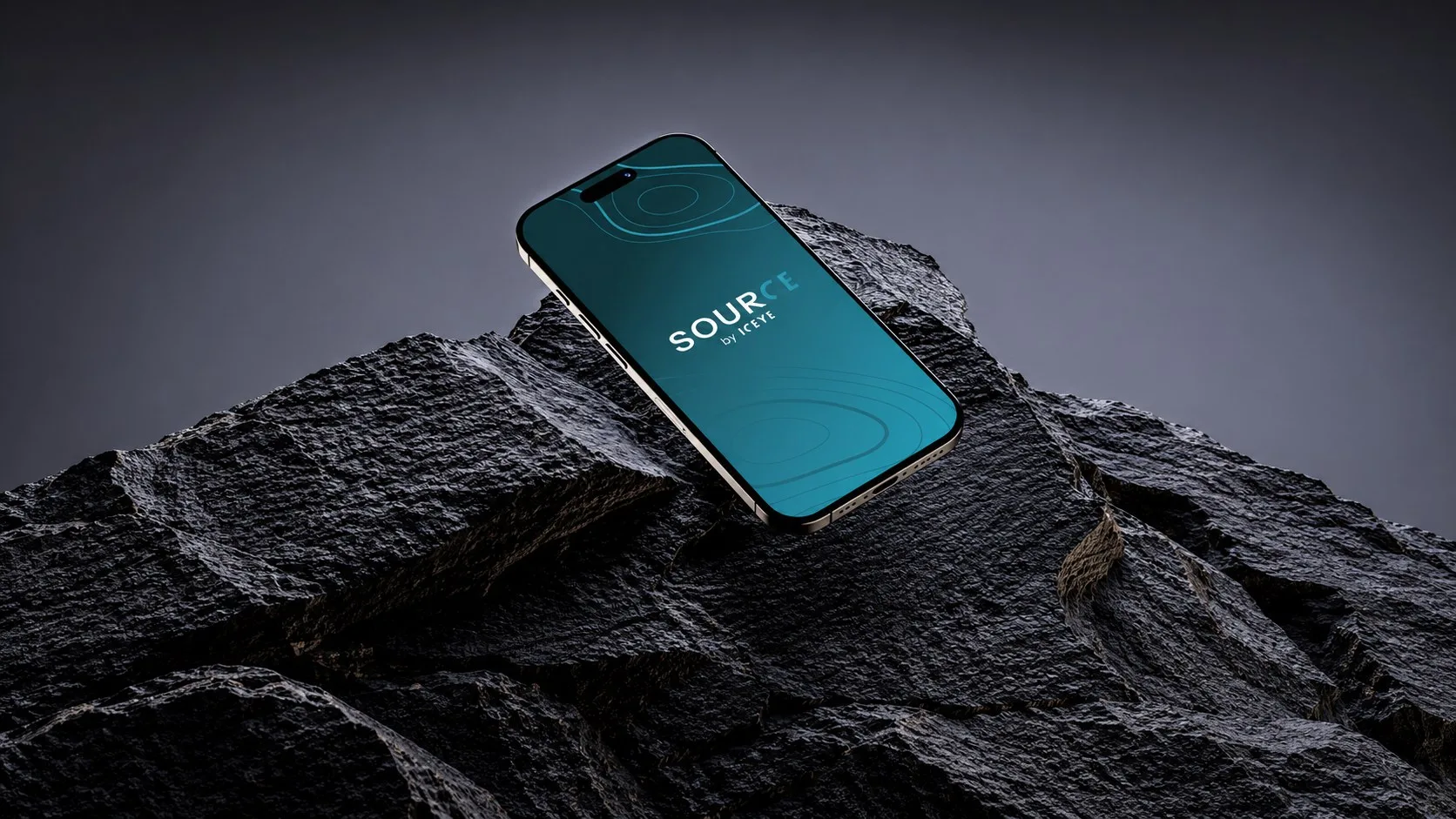
Source by ICEYE is an app that gives access to verified satellite data on natural disasters. It lets users monitor floods, wildfires and landslides in near real time, explore interactive maps and quickly browse reports. All key information is available in one clear, well-organised place.
The goal of the project was to design a solution that organises data, integrates reports with satellite maps and provides fast access to key information – both while a natural disaster is happening and immediately afterwards.
Problem statement
Key challenges for the ICEYE teams and journalists
- Operational overload caused by media requests – handling individual requests manually during a crisis ties up resources and makes it impossible to scale effectively.
- No integration between reports and visualisations – journalists receive static reports, while access to interactive GIS maps with satellite data is difficult or accidental, forcing them to look for sources on their own.
- A reactive collaboration model – the process depends on the media taking the initiative; journalists have to contact ICEYE with requests instead of having constant access to ready-made resources.
- Time pressure in the media – in a crisis, journalists need verified information “right now” and in one place so they can pass it on to their audiences instantly.
How might we?
01
How might we automate the handling of repetitive media requests so the ICEYE team can focus on key tasks without compromising the quality of communication?
02
How might we seamlessly connect static reports with interactive GIS data so journalists get instant, intuitive access to the full picture?
03
How might we move from a reactive model to a self-service platform that gives the media instant access to ready-made resources without the need for direct contact?
04
How might we create a single “source of truth” that delivers verified data in real time to meet the extreme time pressure journalists face?
Design process
01
Discovery
- Problem definition
- Secondary data analysis
- User interviews
- Competitor analysis
02
Learn
- Observations and insights
- Personas
- Jobs To Be Done
- Value Proposition Canvas
- User Journey Map
03
Design
- User stories
- MVP
- Objects and relationships
- User flow
- Wireframes
- Key features and user interfaces
04
Measure
- Usability testing
- Insights
- Development recommendations
Research constraints
Changing the recruitment strategy
Our main goal was to interview journalists from abroad who already had experience working with ICEYE data. Because of the low response rate, we decided to change our strategy. After consulting our business partner, we expanded the target group to include journalists who might use this type of data in the future. Even though they had no previous contact with the company, their perspective helped us identify key needs and expectations shared by a wider audience.
Creating
a proto-persona
Because of recruitment difficulties among ICEYE employees, we couldn’t run enough interviews to build a full persona representing their perspective. However, the two interviews we did conduct allowed us to create a proto-persona.
In-depth interviews
We interviewed two groups: ICEYE employees and journalists who had not used ICEYE data before but could become users in the future.
10 interviews
- 8 with journalists
- 2 with ICEYE employees
How important is time in your work, and which challenges (such as stress or pace of work) do you face most often?
“There is enormous stress and pressure – a lot is happening, you have to act very fast and at the same time precisely, because there is no room for mistakes.”
How do you gather information on the topics you cover?
“The most time-consuming and demanding part of my job is getting to the information and verifying it. That’s because of the amount of disinformation and fake news, and the time it takes to fact-check.”
What are the biggest challenges in obtaining data?
“My job would be much easier if there were one comprehensive database of reports with maps and information about events such as floods or wildfires.”
What challenges have you faced when using GIS data platforms?
“The data exists, but the way it is presented isn’t ideal. It could be displayed in a much simpler and more accessible way.”
Which devices do you use to access GIS data platforms (desktop, mobile)?
“Access to the most up-to-date data is a big challenge for me. I often work outside the newsroom, so quick access to current information is crucial, regardless of where I am or which device I’m using.”
We identified the following pain points:
Competitor analysis
Comparing ICEYE with its DIRECT competitors (Capella Space, Synspective, Copernicus) leads to several key conclusions:
- ICEYE’s advantage: speed of data delivery. ICEYE stands out with almost instant access to data, which gives it an edge over competitors (e.g. Copernicus, which is slower).
- ICEYE’s weakness: scattered data and complicated access. Competitors (e.g. Capella) offer central platforms with visualisations. ICEYE’s data and maps are spread across different places, which makes it hard to move between them.
- Overly technical communication. Like its competitors, ICEYE uses highly specialised language. This is a barrier for journalists and users outside the industry.
- Unique value: reports for the media. ICEYE is one of the few companies that provides ready-made reports for the media – an advantage competitors often don’t offer.
- Positioning: accessibility for a wide audience. While competitors (e.g. Synspective, Capella) target mainly the B2B and government sectors, ICEYE has the potential to reach the media, NGOs and education more broadly.
Observations and insights
Observations
- Scattered data. Reports on the ICEYE website are scattered – users have to click through many subpages to find the material they need.
- Hard-to-reach reports. Every PDF download requires an email address and a form, which slows down getting information and may discourage users.
- No clear access to GIS maps. Finding the link to the GIS maps turned out to be difficult. Access was neither intuitive nor clearly labelled – the link was found by chance in the text of an article.
- Difficult, hard-to-understand data. Data and materials are often presented in a technical way. Numbers, charts and specialist terms dominate, which can be a barrier for people outside the industry. “The data is there, but its form is not what we’d like – some things could be written much more simply.”
Insights
- Time matters. Journalists want instant access to data so they can react quickly and write articles in real time.
- Reliable data is essential. The growing amount of online disinformation means journalists look for verified, trustworthy data so they don’t lose time on extra fact-checking.
- Access to data at any time. Journalists use different devices – both computers and phones. Lack of full responsiveness and mobile functionality can limit access to data in the field or on the go.
- All data in one place. Reports and GIS maps are not integrated into one tool. Reports are on the ICEYE website, while GIS maps and satellite views are on a separate site.
- The form of data matters. Current reports and visualisations are too hard to digest for many users. Too many numbers and technical details make it difficult to quickly understand the context and draw the most important conclusions.
User persona
We created two personas – a primary and a secondary one – representing the key user groups of the app. We also developed one proto-persona because of the limited number of interviews with ICEYE employees. The personas helped us better understand user needs and tailor the app’s features to the real requirements of different groups.

Primary persona
Karol Ulewa
News journalist
- Journalism, Jagiellonian University
- 34 years old
- Poland
“My goal is to give people knowledge that can save lives – especially in the face of natural disasters that can affect all of us. I write about local matters because I believe awareness and understanding make a community stronger and more resilient.”
Goals
- Delivering reliable weather information fast
- Sharing local news instantly based on verified data
- Keeping content quality high despite time pressure and language barriers
- Working more closely with scientists to enrich articles with valuable data
- Raising awareness of climate change
- Saving human lives
Pain points
- Stress caused by time pressure and the need to react quickly to local events
- Uncertainty caused by unpredictable weather
- Difficulty understanding some types of data
- Limited English, which makes access to international sources harder
- Limited tools – no use of advanced platforms such as GIS
Information architecture
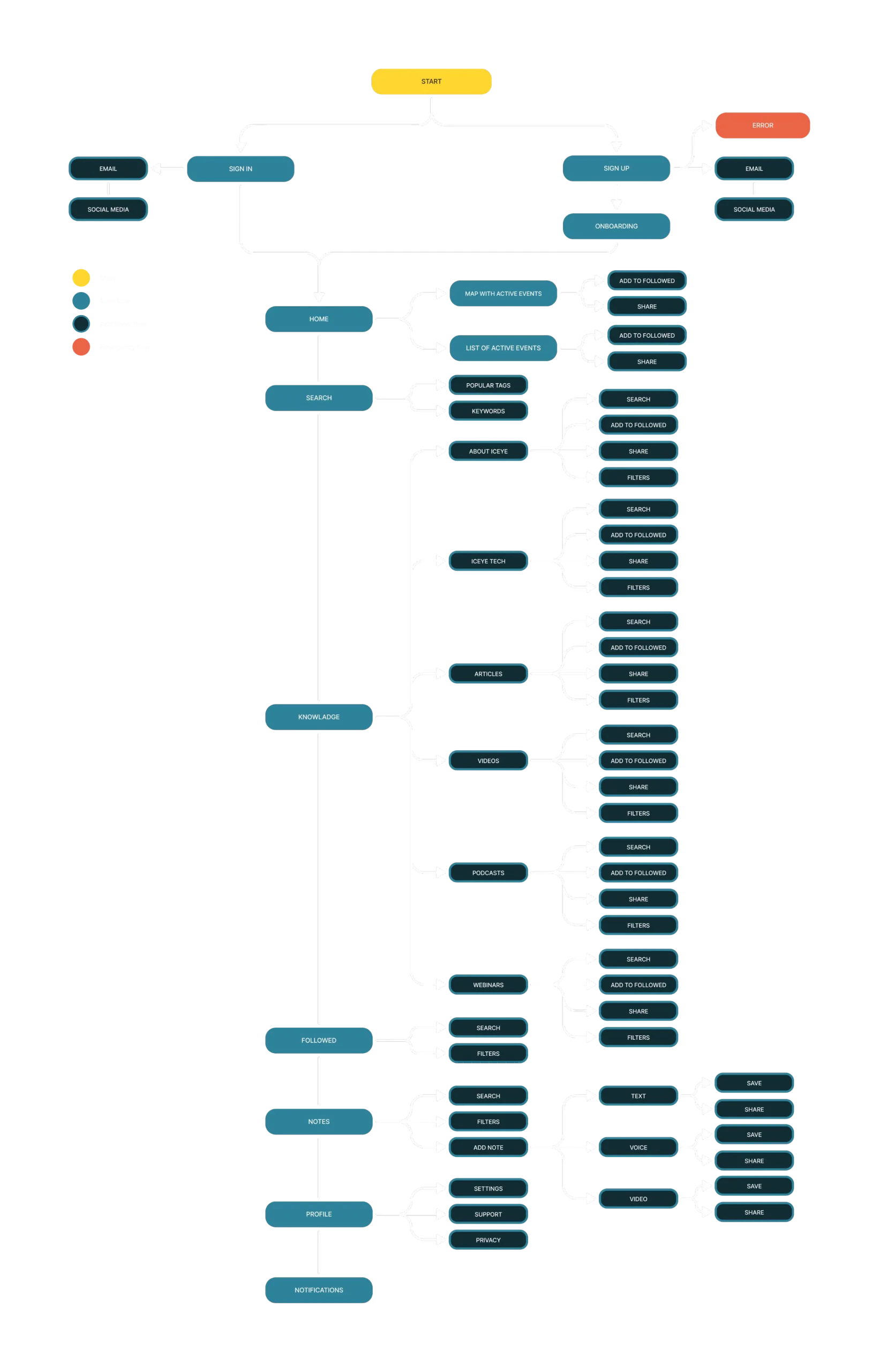
We started the design process with an Object-Oriented UX approach to fully understand how the app should work. Our main goal was to define the key objects in the system and understand the relationships between them. Organising the data this way allowed us to create a logical structure for the app.
Wireframe
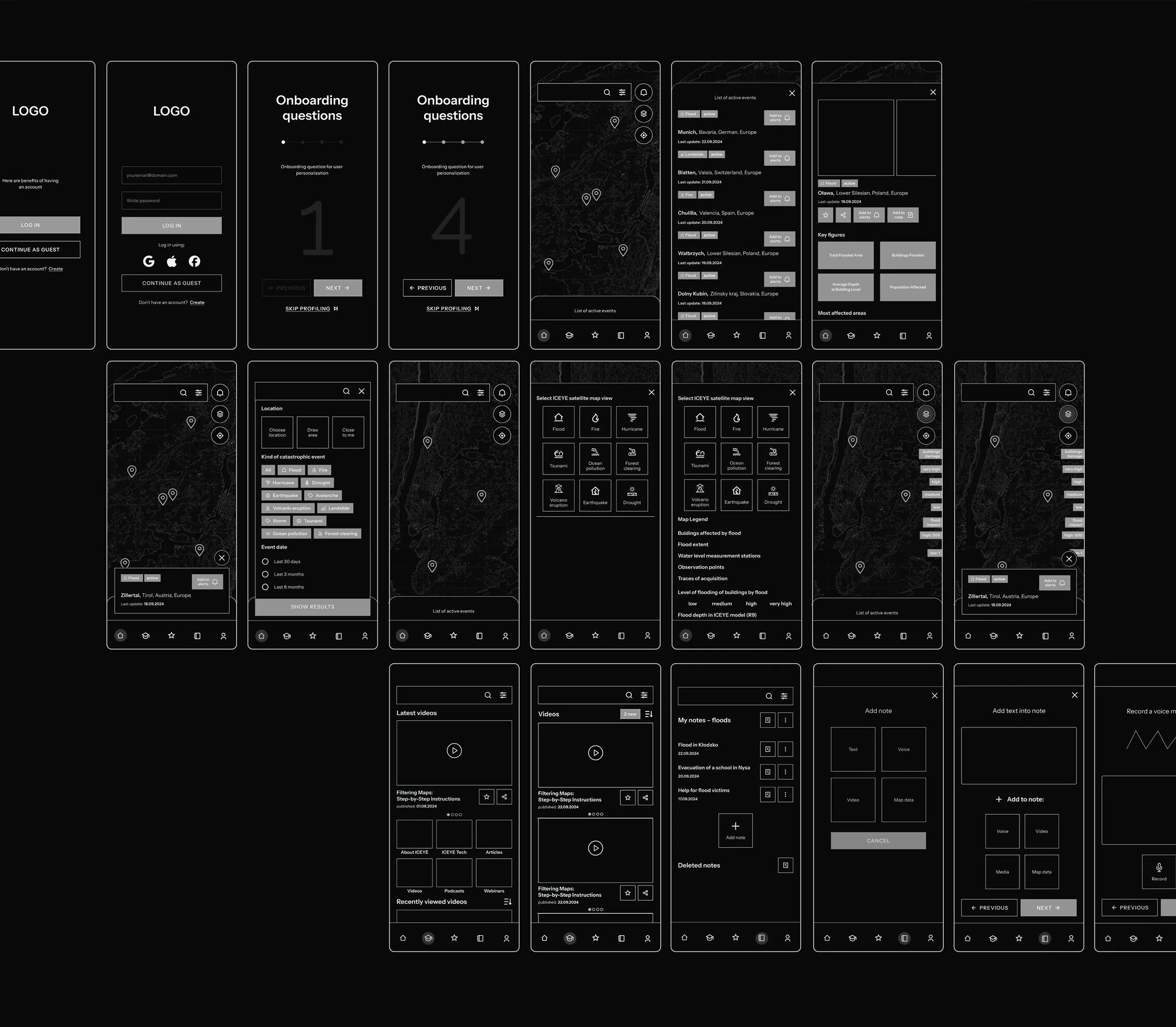
We started the interface work with hand-drawn sketches, which let us exchange ideas freely. At the same time we gathered inspiration from apps that use maps and are known for great design. Next, we moved the concepts into Figma. Thanks to a clear division of roles and the earlier concept work, we quickly created the first version of an interactive prototype. This allowed us to hold an in-depth consultation with our business partner and verify our design assumptions.
Usability testing
We ran moderated usability tests using the think-aloud protocol. The tests took place in two iterations – some remotely and some in person. Participants took on the role of Karol Ulewa and completed tasks we had prepared, set in a story-based context.
5 tests
- 2 with journalists we had interviewed individually
- 3 with new journalists recruited in the second round
After testing we made 12 changes in total. In this case study I present 4 of them.
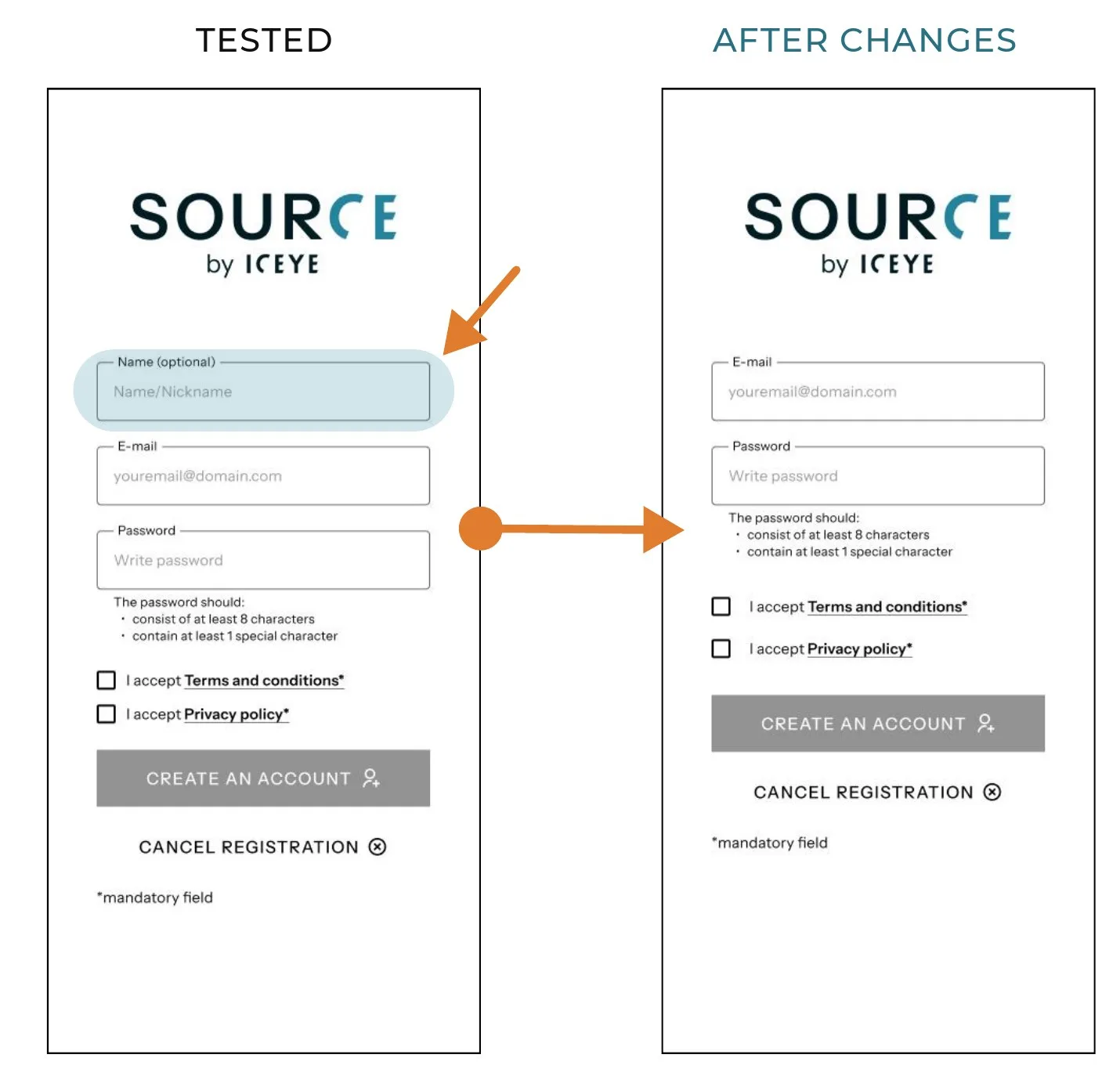
Unclear name field during sign-up
Users weren’t sure why they were asked for their name or what it would be used for.
Solution: we removed the name field (we only collect the data we really need).
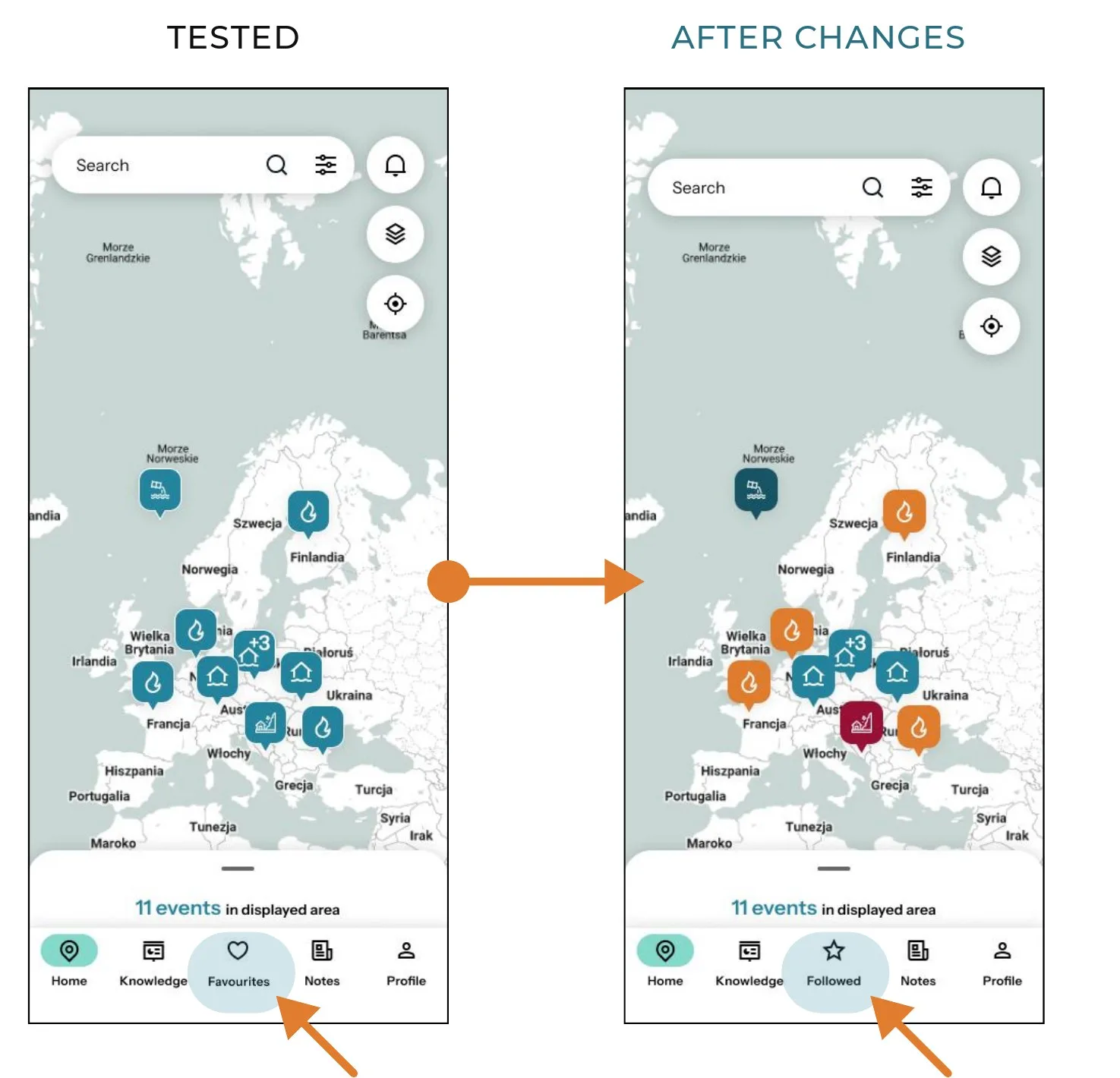
Inappropriate icon for followed content – the heart icon
Although the heart icon is widely associated with “favourites”, it was perceived negatively in the context of following disasters, evoking associations inappropriate to the seriousness of the topic.
Solution: we changed the icon and label to something more emotionally neutral.
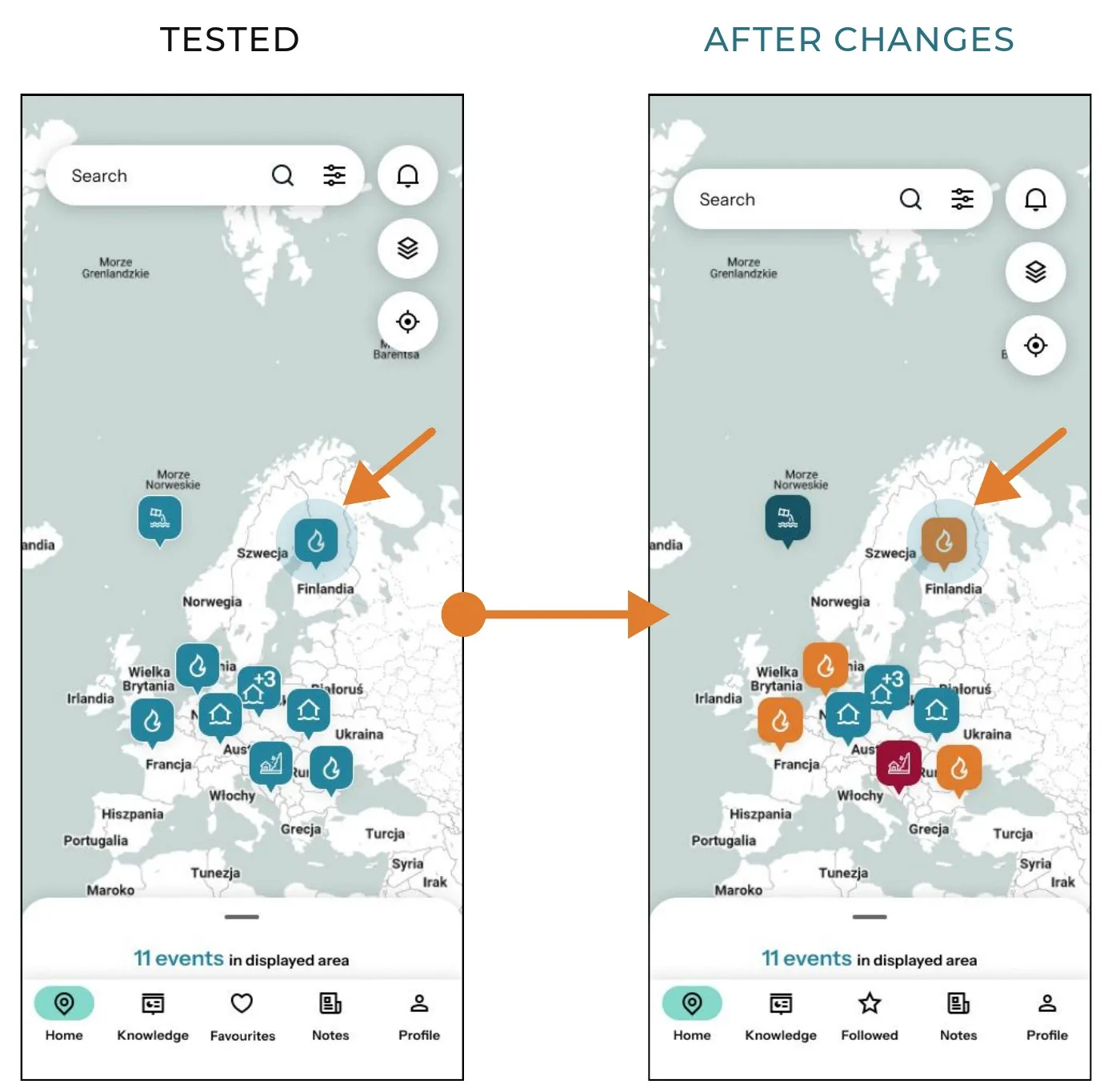
Icons that were hard to tell apart
Users struggled to quickly tell disaster types apart (wildfire, flood, etc.) despite different icons – on the map everything blended together.
Solution: we added an extra visual distinction – each disaster type now has its own colour.
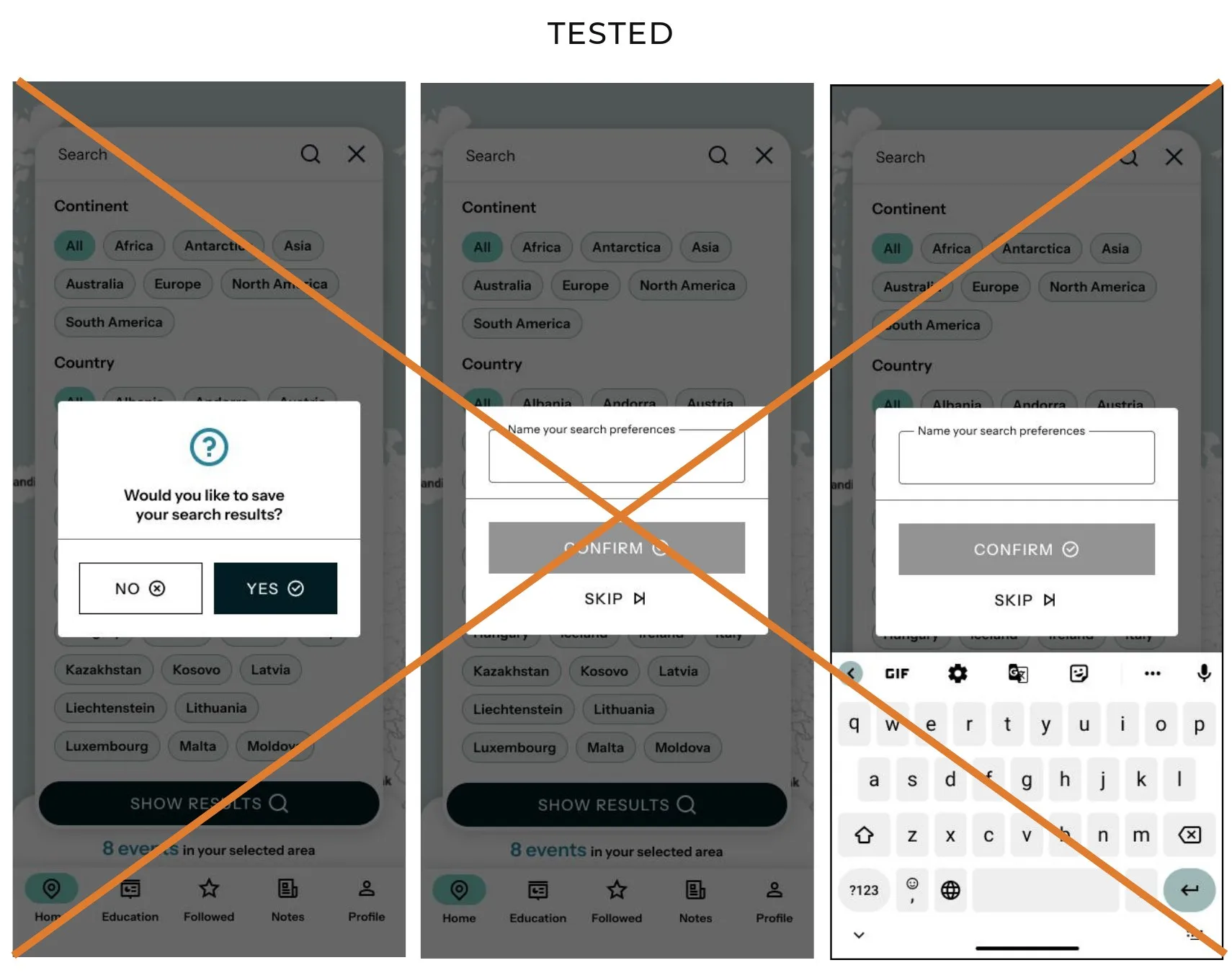
Too long a path for saving search results
Having to name saved data every time was tedious and unintuitive for users.
Solution: we dropped these screens in favour of automatic suggestions that appear in the global search as search history.
Key features and user interface
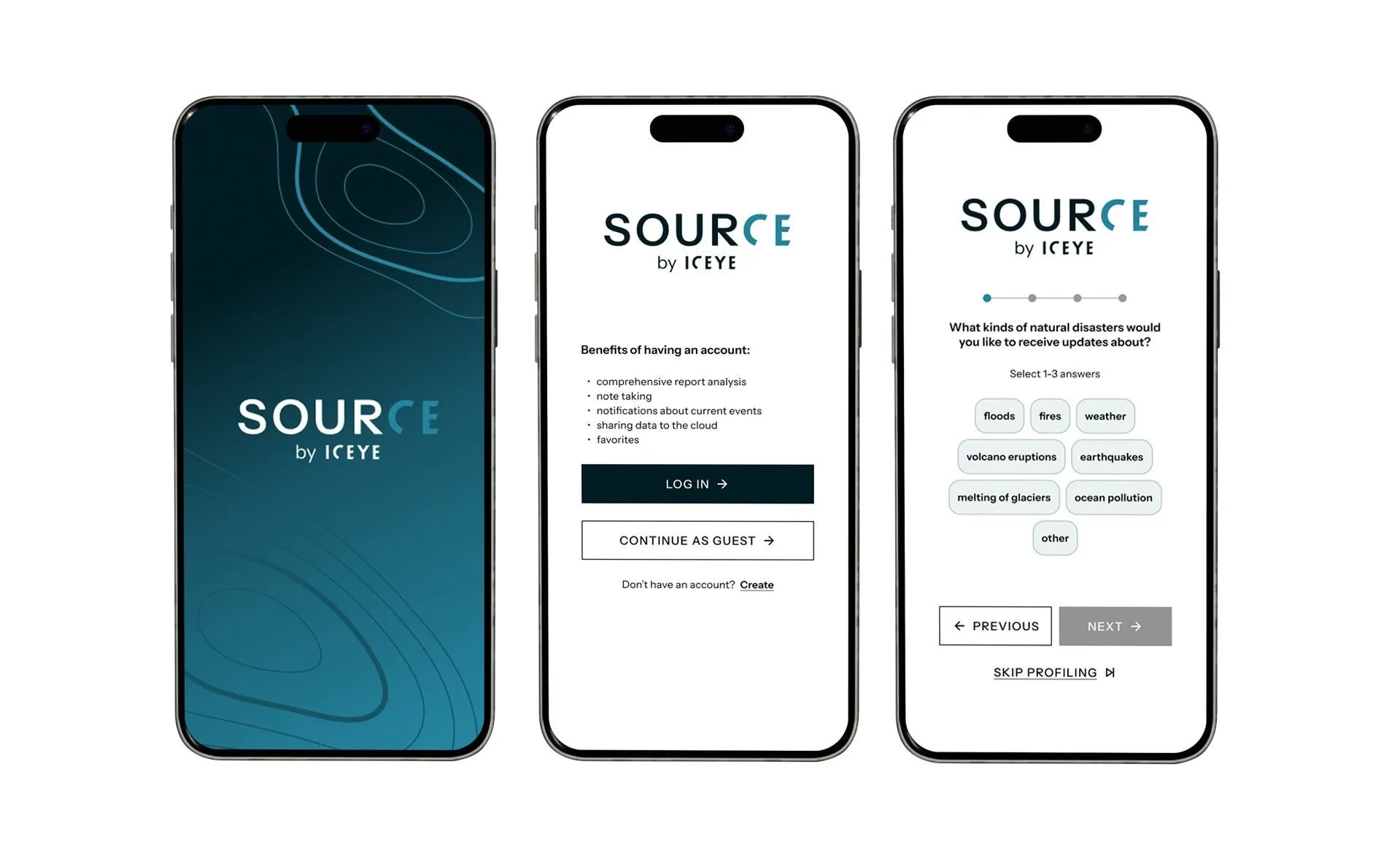
Because ICEYE is still not well known on the Polish market, we thought of creating a dedicated landing page with key information about the company and materials that build trust in the data platform. One of the elements encouraging people to download our app are the Google Play screens we designed. They describe the most important features, showing users the range of information they can get from the app.
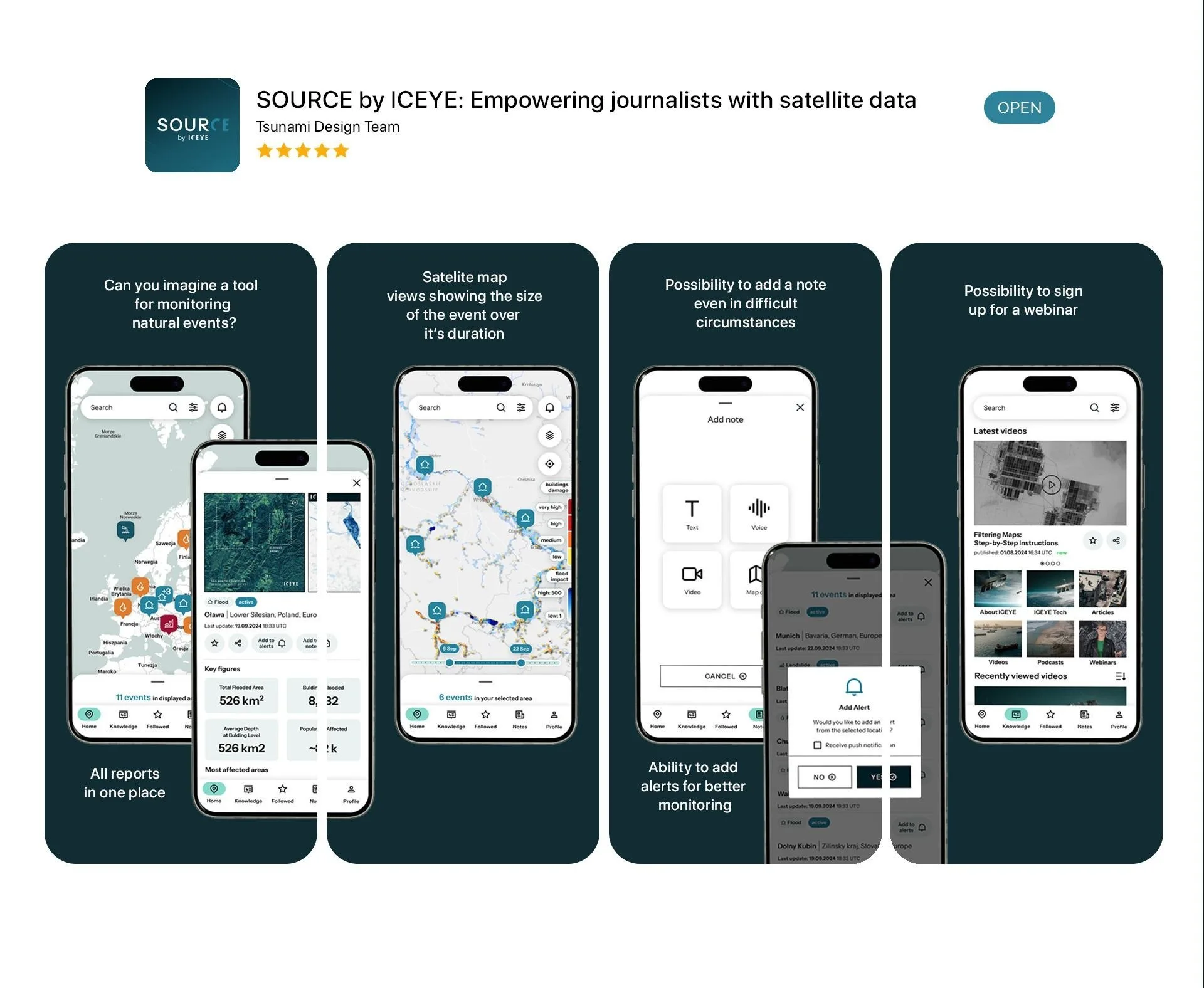
KEY FEATURES
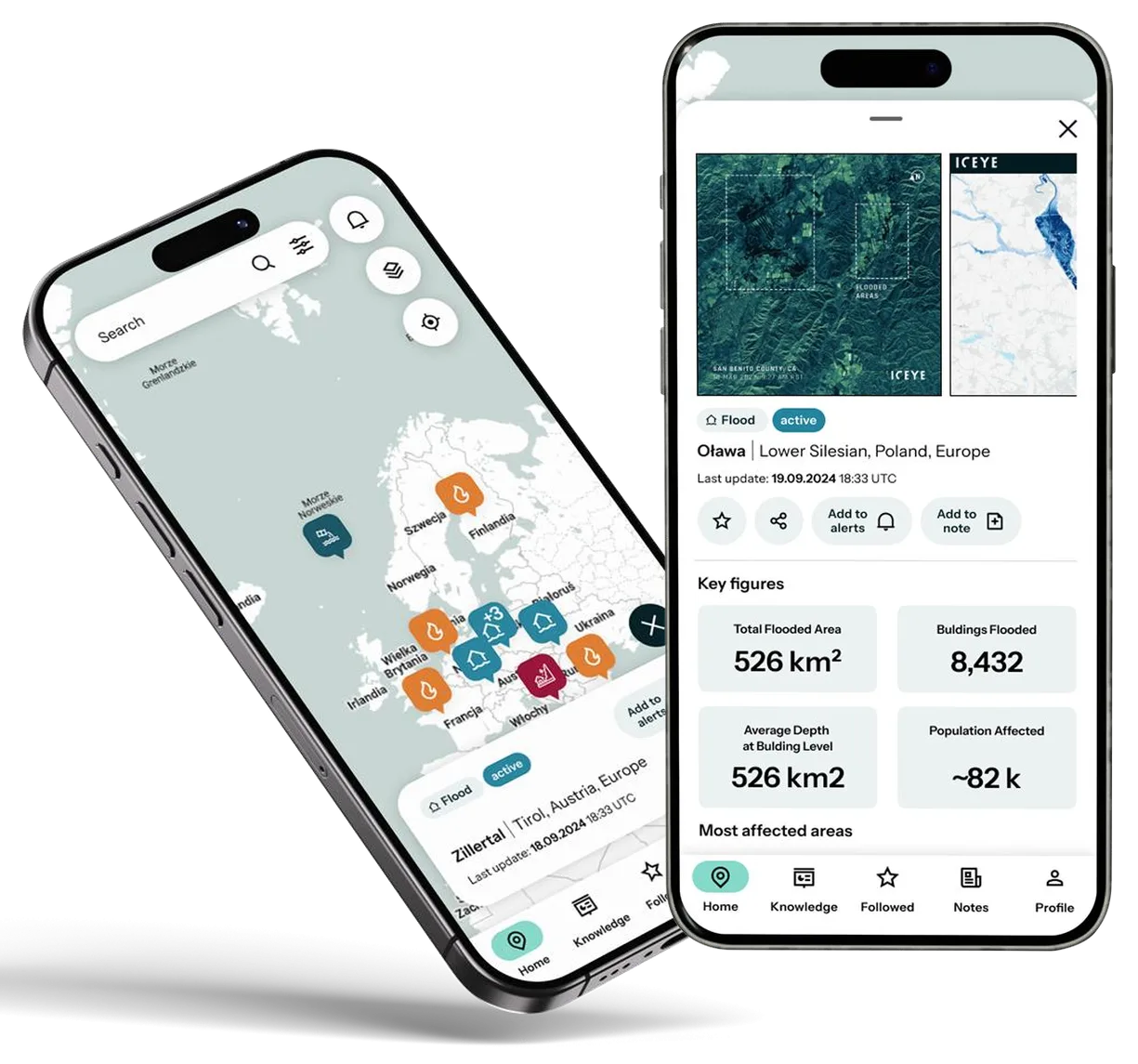
Everything in one place – map, data and reports
Our app gathers all the key data in one place. Users no longer have to switch between multiple sources or browser tabs – everything is available in a single view. By combining an interactive map with reports, users can easily check exactly where an event happened and then quickly move to related reports and satellite maps. Search and filtering tools make finding the information they need much easier.
What are the benefits of this feature?
- Time savings
- Clarity and better organisation of work
- More intuitive and efficient work with data
KEY FEATURES
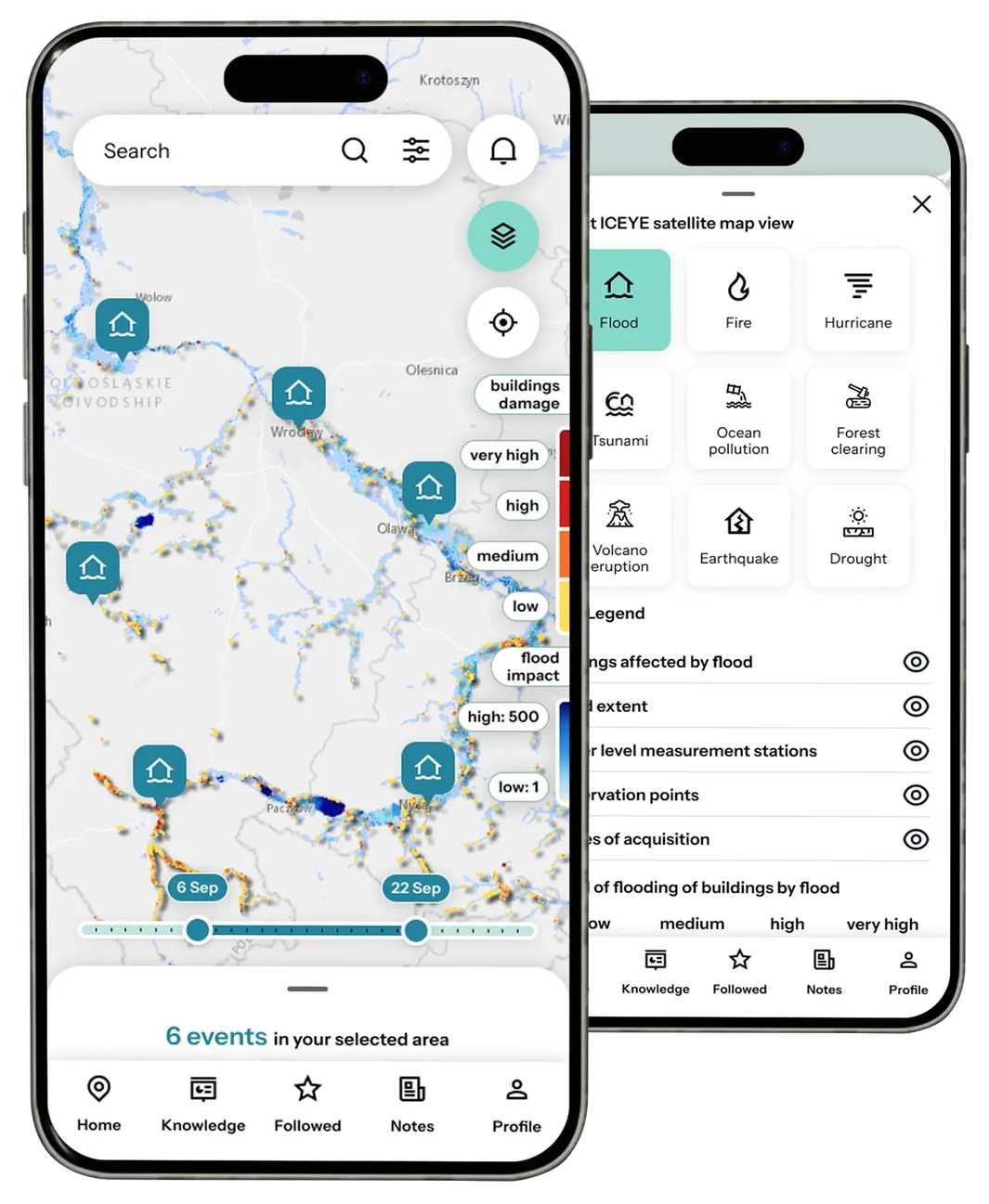
Switching to ICEYE satellite maps
Users can switch to the satellite view to better assess the situation on the ground and choose a specific disaster type (e.g. flood, wildfire, landslide). After selecting an event:
- a contextual legend appears, explaining the symbols and colours on the map,
- the user gets a dedicated data layer, such as the scale of damage, flooded areas or satellite images,
- they can use filters and search to easily find specific reports or locations.
What are the benefits of this feature?
- Helps users focus on relevant events
- Makes it possible to filter the right information
- Makes analysis easier
KEY FEATURES
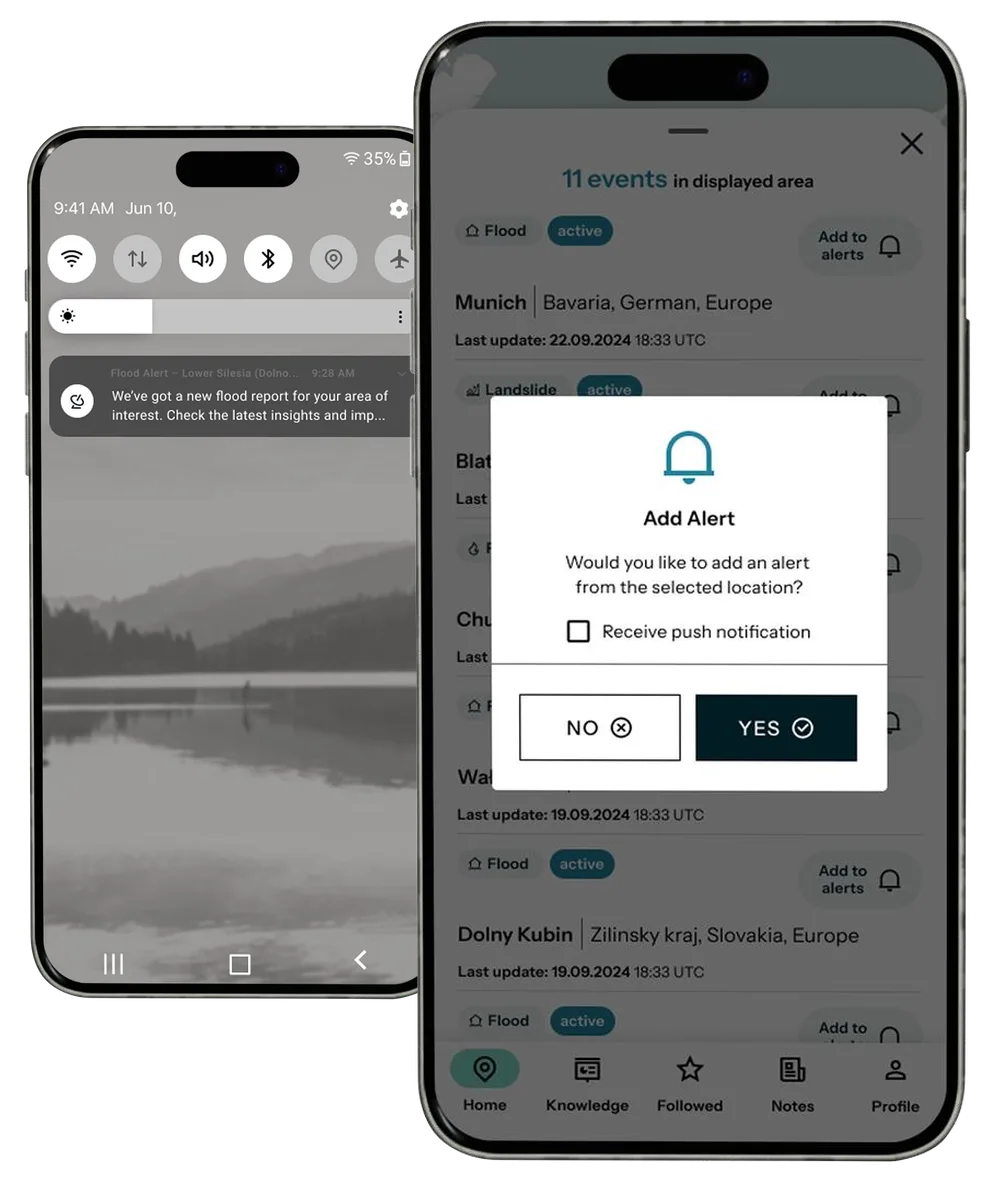
Alerts and push notifications
This feature keeps users up to date with relevant events without having to check the app constantly. Users can set the areas and disaster types they care about (e.g. floods in southern Europe), and the app automatically sends notifications when new events or data updates appear. Push notifications work even when the app is closed, so users never miss key information.
What are the benefits of this feature?
- Users can focus on daily tasks without missing key updates
- Higher engagement through ongoing contact with the platform
- Delivering the right content at the right moment
- Helping users make more effective use of ICEYE data
KEY FEATURES
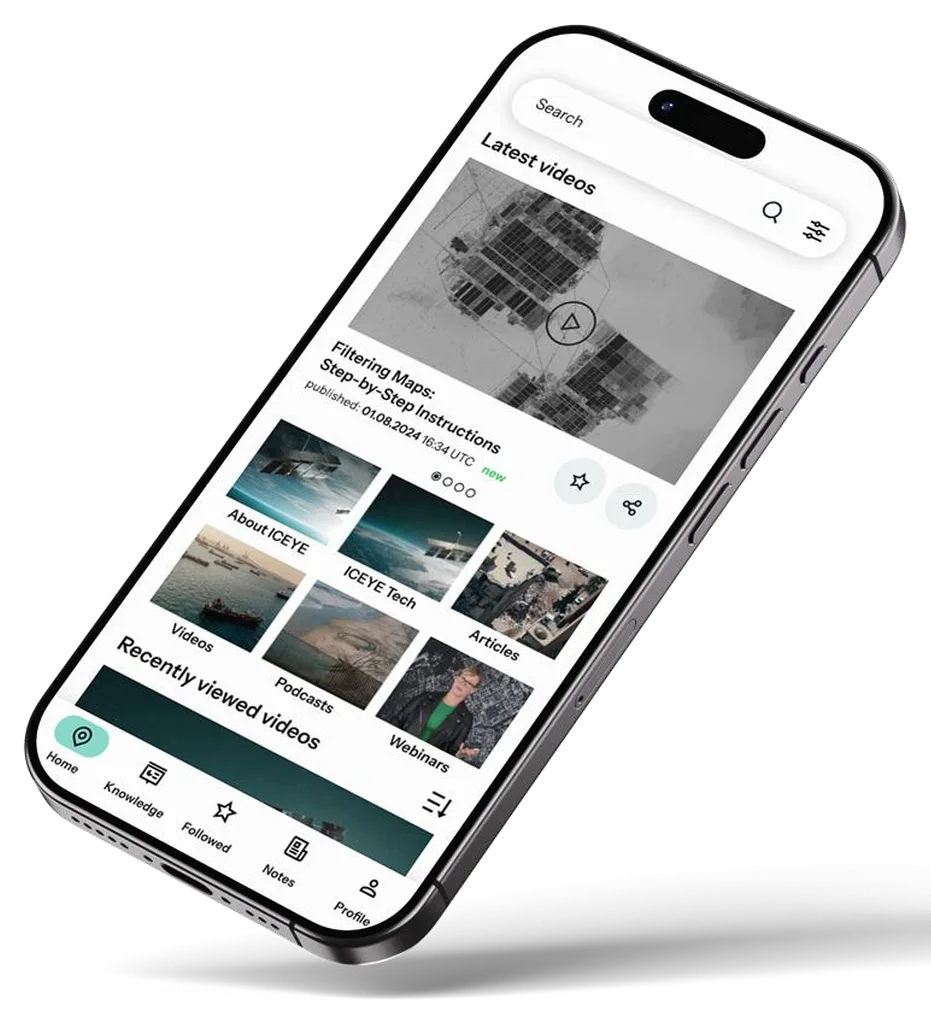
Knowledge corner – a space for learning and building trust
An educational section for users who want to better understand satellite data, SAR technology and how ICEYE works. It includes video tutorials, articles, case studies, expert webinars and information about the company, its mission and technology.
What are the benefits of this feature?
- Better use of data through a deeper understanding of it
- The ability to verify the data source
KEY FEATURES
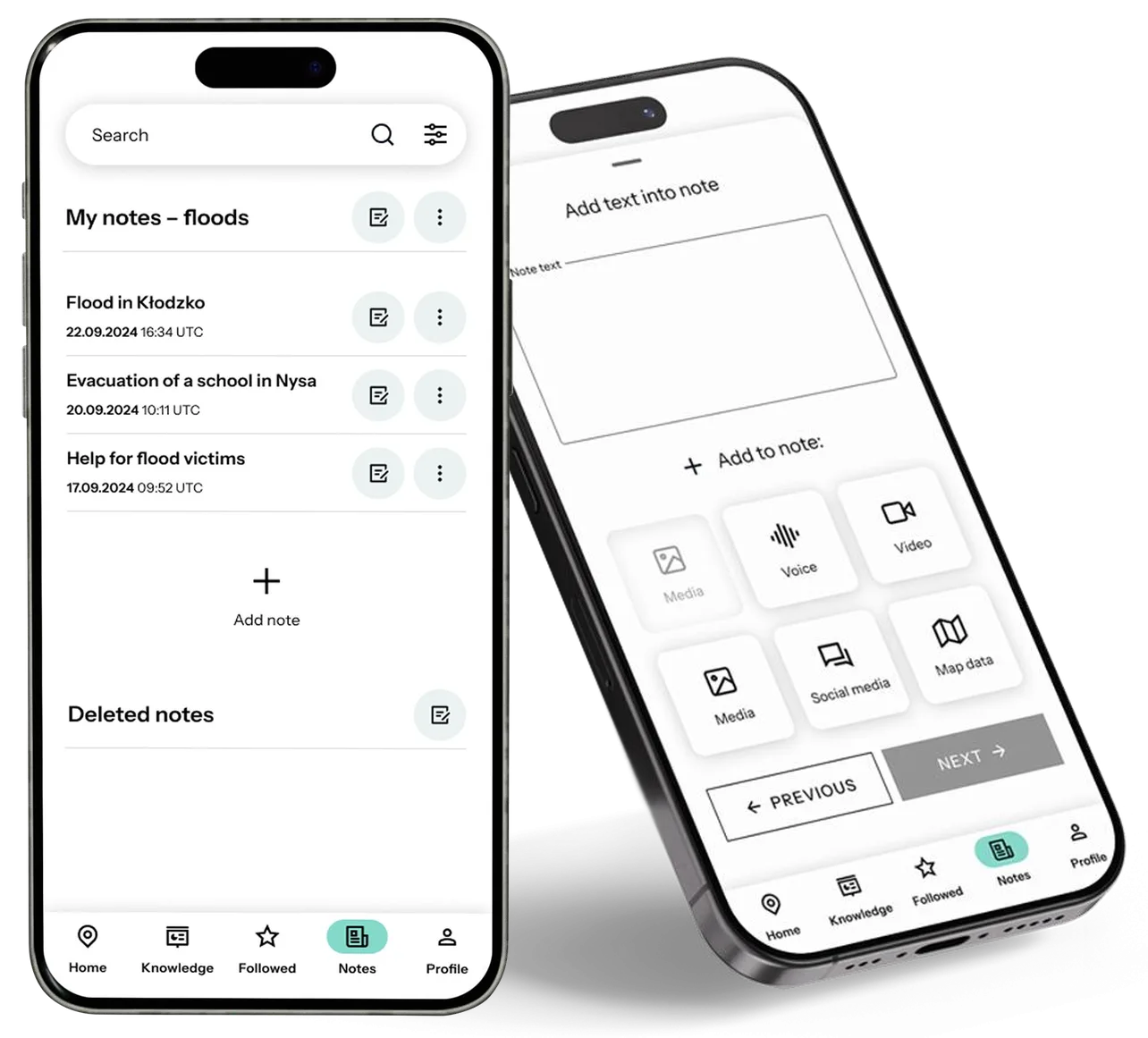
Note-taking and content export
Users can quickly add notes while browsing maps, reports or satellite views. Each note is linked to a specific location or report. Notes can be text, voice or video. It is a convenient way to capture observations, quotes and ideas without leaving the app.
What are the benefits of this feature?
- Support for users working under time pressure
- Quickly collecting information and insights without interrupting work
- Easier information management thanks to notes linked to specific places or reports
ADDITIONAL FEATURE
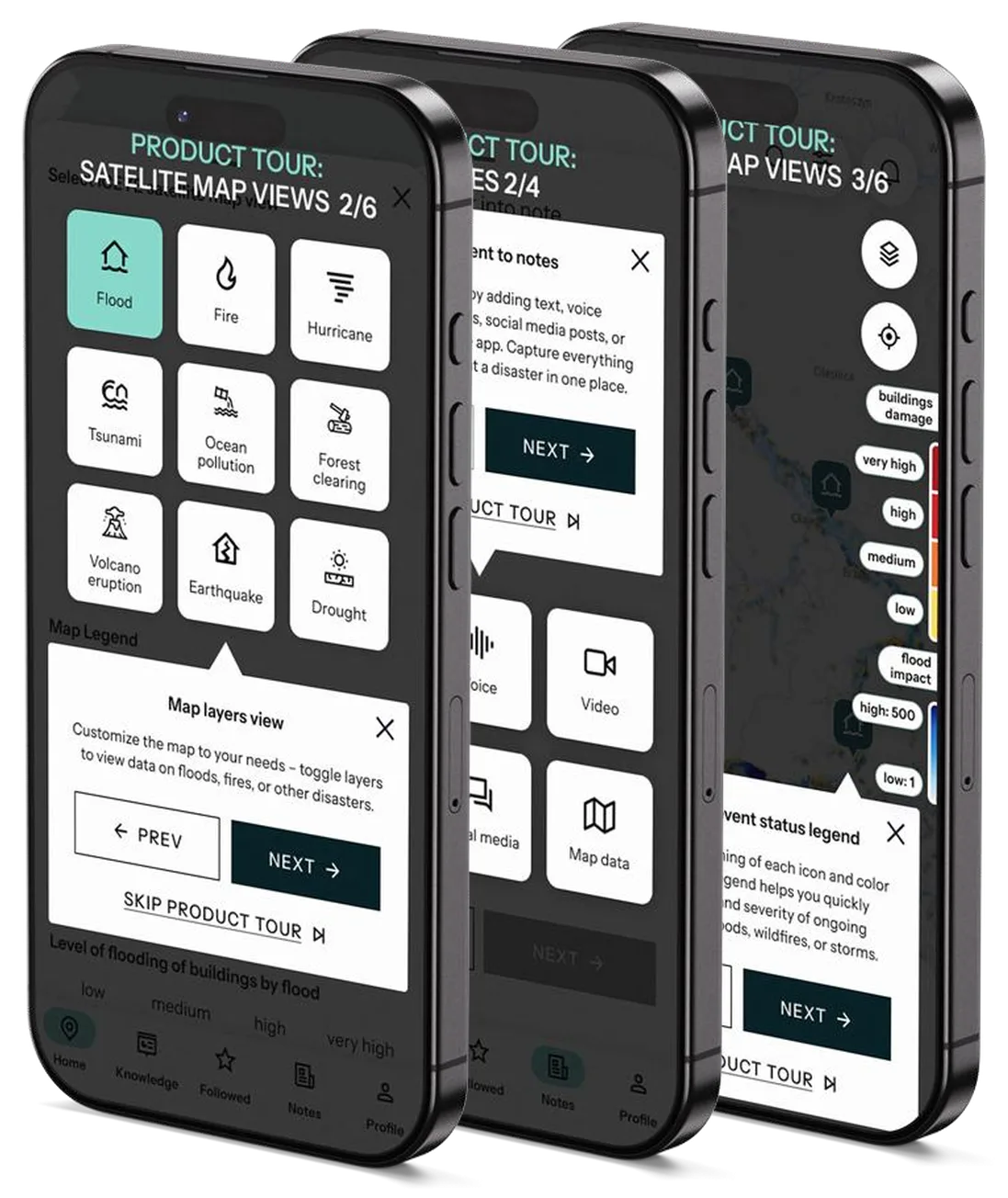
Tooltips
To make users’ first steps in the app easier, we introduced animated onboarding tooltips. These are contextual hints that appear the first time users enter selected sections. Tooltips help users understand how features work and explain the meaning of icons and interface elements.
What are the benefits of this feature?
- After seeing them, users can use the app with confidence, knowing what they are doing. A simple solution that makes getting started easier and the interface more intuitive.